Accessing Data via API
Introduction
This guide explains how to access IOTFactory platform data via API.
You will learn how to:
- Create an API key and define access rights for a user group.
- Authenticate users using an API key or token.
- Use API endpoints to retrieve assets and their data.
Prerequisite: API access requires authentication and authorization.
Setting Up API Access
Create a User Group and Define Access Rights
- In the Account Manager, go to user group.
- Create a new group.
- Define access rights per API for the group.
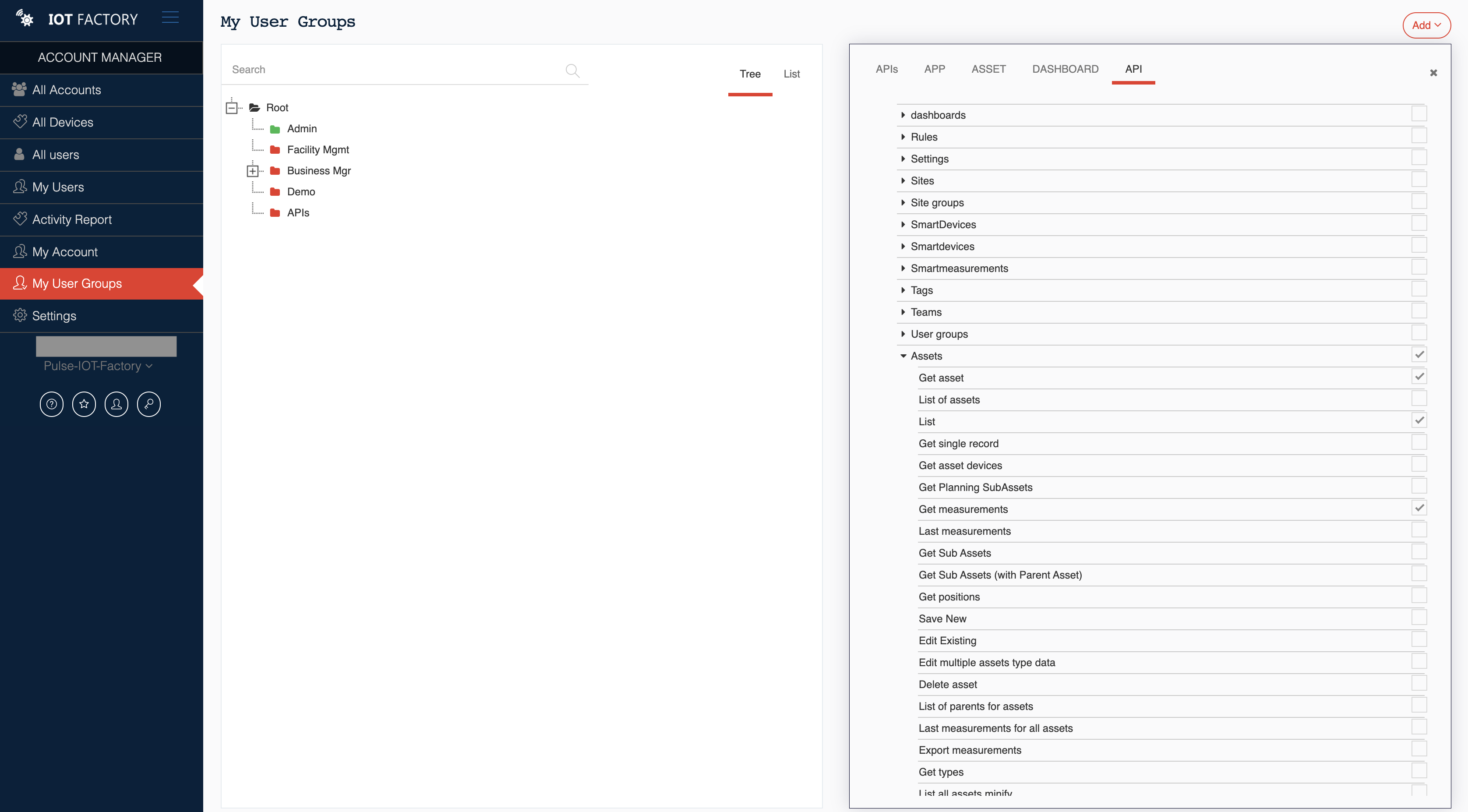
Generate an API Key
- In the Account Manager, navigate to settings > Global.
- Select the API Keys entry.
- Click Add API Key.
- Assign the key to the user group you created.
- Save and copy the generated API key (it will not be displayed again).
⚠️ Important: Store this key securely. It is required for authentication.

Authentication
Log In
To authenticate a user, use the following endpoint:
- Method: POST
- Required Data (JSON format):
json
{
  "email": "your@email.com",
  "password": "your_password"
}
Success Response: A JSON object containing an authentication token in `res.data._id`.
Example:


json
{
  "data": {
    "_id": "your_authentication_token"
  }
}
Using the Token
- Store the token in your application (e.g., HTML5 Local Storage).
- For all authenticated requests, include the token in the HTTP header:
http
Authorization: Bearer your_authentication_token
Log Out
To log out, simply delete the stored token from your application.
Best Practices
- Security: Never share your API key or token.
- Storage: Use secure mechanisms (e.g., environment variables, encrypted Local Storage).
- Error Handling: Always check the API response to handle failures (e.g., expired token).
How to get the assets, assets details and asset data
This use case shows you the APIs you can use to obtain a list of all the assets in your account, obtain the details of an asset based on its identifier and retrieve data from connected devices.
Assets
List all assets for the currently logged-in user.
GET ASSETS https://report.iotfactory.eu/api/assets?fields=_id&fields=name
Request headers
For all authenticated requests, include the token in the HTTP header:
http
Authorization: Bearer your_authentication_token
URL Variables
| path | type | presence | description | default | conforms | allowed | valids | invalids |
| — | — | — | — | — | — | — | — | — |
| \- | object | optional | ||||||
| status | string | optional | List only assets on this state | `“active”` | `“new”` `“active”` `“archived”` `“all”` | `““` | ||
| search | string | optional | Global search value | `”“` | ||||
| sort | string | optional | `”timestamp”` | `““` | ||||
| order | string | optional | `”desc”` | `“asc”` `“desc”` | `““` | |||
| page | number | optional | `0` | `null` `null` | ||||
| limit | number | optional | `100` | `null` `null` | ||||
| tags | array | optional | Filter on tags | `unique` | ||||
| tags \[+0 \] | string | optional | `”“` | |||||
| geoloc | boolean | optional | Only geolocalized assets | `false` | ||||
| mainAsset | string | optional | Geoloc filter: Filter on the asset it was in planning. Format: ids | `”“` | ||||
| site | string | optional | Geoloc filter: Filter on sites it was in planning. Format: ids | `”“` | ||||
| state | string | optional | Geoloc filter: Came from/Went to the site (only if a site was sent in the query) | `”“` | `”“` `”from”` `“to”` | |||
| withPlanningInputs | boolean | optional | `false` | |||||
| to | date | optional | Geoloc filter: Check in plannings a planning to that date | |||||
| from | alternatives | ignore | ||||||
| fields | array | optional | Return only referenced fields (useless when site is defined) | `unique` | ||||
| fields \[+0 \] | string | optional | `““` | |||||
| group | array | optional | filter: Came from/Went to the group (only if a group was sent in the query | `unique` | `”“` | |||
| lookup | boolean | optional | `false` | |||||
| onSite | boolean | optional |
Asset
Get one asset by ID
GET ASSET https://report.iotfactory.eu/api/assets/{id}
Request headers
For all authenticated requests, include the token in the HTTP header:
http
Authorization: Bearer your_authentication_token
URL Params
| path | type | presence | description | invalids |
| — | — | — | — | — |
| \- | object | optional | ||
| id | string | required | Identifier of the asset | `”“` |
—
URL Variables
| path | type | presence | description | default |
| — | — | — | — | — |
| \- | object | optional | ||
| populateParents | boolean | optional | if true, 'parents' property will be added to the response | `false` |
Get measurements from asset devices
GET ASSET https://report.iotfactory.eu/api/assets/{id}/measurements
URL Params
| path | type | presence | description | invalids |
| — | — | — | — | — |
| \- | object | optional | ||
| id | string | required | asset id | `”“` |
—
URL Variables
| path | type | presence | description | default | conforms | allowed | valids | invalids |
| — | — | — | — | — | — | — | — | — |
| \- | object | optional | ||||||
| before | date ISO8601 YYYY-MM-DDTHH:mm:ss.sssZ | optional | Return only measurements before this date | |||||
| after | date ISO8601 YYYY-MM-DDTHH:mm:ss.sssZ | optional | Return only measurements after this date | |||||
| page | number | optional | `0` | `null` `null` | ||||
| limit | number | optional | limit by measurements and smartmeasurements | `100` | `min: 0` | `null` `null` | ||
| type | array | optional | Select only measurements of this type | `unique` | `”“` | |||
| device | string | optional | Device id | `”“` | ||||
| tags | array | optional | Filter by (smart)devices tags | `unique` | `”“` | |||
| step | string | optional | By step | `”“` `”quarthourly”` `“hourly”` `“daily”` `“weekly”` `“monthly”` `“yearly”` | ||||
| merge | boolean | optional | Merge measurements of same timestamp |
Devices, smart devices or static lists can be attached to an asset. The identifiers of these objects can be found in the corresponding table of an asset.
Ex: Get the last ten weekly smart measurements of a smart devices (_id:6513e6769a0d12001268d169) attached to an asset(_id:6508132813019d0012630749) after the 16/11/2023 10pm UTC
https://report.iotfactory.eu/api/assets/6508132813019d0012630749/measurements?device=6513e6769a0d12001268d169&type=Occupied (first)&step=weekly&limit=10&after=2023-11-16T22:00:00.000Z
Result:
    {
  "data": [
      {
          "_id": "65aef1c2d6c621996407a92c",
          "smartdevice": {
              "id": "6513e6769a0d12001268d16c",
              "team": "1ha4pei7n.hp",
              "name": "Desk occupied"
          },
          "timestamp": 1705878000000,
          "updatedAt": "2024-01-23T14:36:18.131Z",
          "device": {},
          "staticList": {},
          "measurements": [
              {
                  "type": "Occupied (first)",
                  "value": 0,
                  "before": 1705878000000,
                  "at": "2024-01-21T22:55:00.000Z",
                  "unit": "",
                  "cache": true
              }
          ]
      },

      ...

      {
          "_id": "6573242b70f14a87dbaf0079",
          "smartdevice": {
              "id": "6513e6769a0d12001268d16c",
              "team": "1ha4pei7n.hp",
              "name": "Desk occupied"
          },
          "timestamp": 1700434800000,
          "updatedAt": "2023-12-08T14:14:35.531Z",
          "device": {},
          "staticList": {},
          "measurements": [
              {
                  "type": "Occupied (first)",
                  "value": 0,
                  "before": 1700434800000,
                  "at": "2023-11-19T22:55:00.000Z",
                  "unit": "",
                  "cache": false
              }
          ]
      }
  ],
  "pages": 1,
  "parent": {
      "_id": "6508132813019d0012630743",
      "name": "Anderlecht"
  },
  "recordsFiltered": 10
  }